MarkItDown: one call that turns any file into clean Markdown
PDFs, slide decks, spreadsheets, scanned images, audio, even a YouTube URL — Microsoft's MarkItDown collapses all of them into the one format an LLM actually reads well. Here's what it does, how it's built, the security footnote most people skip, and where it slotted into my own stack.
Every team building with LLMs hits the same unglamorous wall before they hit any of the fun ones: the model is brilliant at reading text, and almost nothing you actually own is text. Your knowledge lives in PDFs, slide decks, spreadsheets, scanned contracts, meeting recordings, and the occasional Word doc someone emailed in 2019. Before a single token reaches the model, somebody has to turn that pile into clean, readable text — and that boring step is where most retrieval pipelines quietly bleed quality.
Microsoft's [MarkItDown](https://github.com/microsoft/markitdown) is the smallest possible answer to that wall. It's a lightweight Python utility — built by the same team behind AutoGen — that takes almost any file you throw at it and returns clean Markdown. One import, one call: md.convert("report.pdf").text_content. That's the entire surface area for the common case. No service to stand up, no API key for the basic path, no config file.
The reason it targets Markdown specifically — and not plain text, and not some rich JSON — is the whole point, so it's worth saying plainly: Markdown keeps the structure an LLM cares about while staying radically token-cheap. Headings stay headings. Tables stay tables. Bold, lists, and links survive the trip. You get the document's skeleton without the formatting bloat, which is exactly the trade a context window wants.
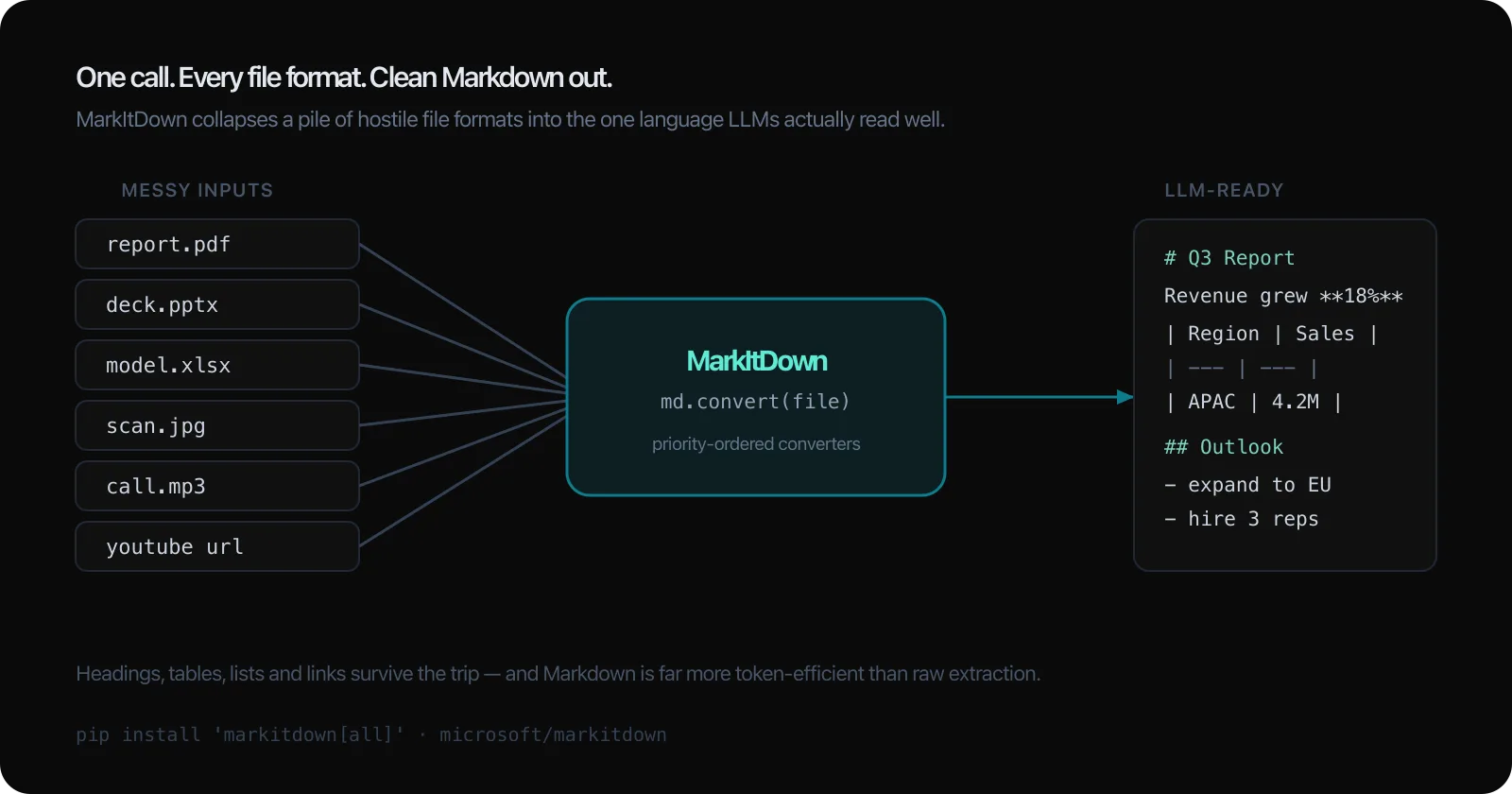
The format list is the part that makes you raise an eyebrow, because it's long and most of it just works. MarkItDown handles PDF, PowerPoint, Word, and Excel — the office four that account for most of anyone's document debt. It does images too, pulling out EXIF metadata and running OCR on whatever text is in the picture. It transcribes audio to text. It parses HTML, CSV, JSON, and XML, unpacks ZIP archives by converting each file inside, reads EPub books, and — the one that always gets a reaction — takes a YouTube URL and gives you back the transcript.
The through-line across all of it: the output is built for the machine, not for you. MarkItDown is explicit that it's optimized for text-analysis tools and LLMs, not for high-fidelity human reading. A converted slide deck won't look like the slide deck. It'll read like a clean outline of everything the slide deck said — which is precisely what you want to hand a model, and not at all what you'd want to hand a designer.
That single design decision quietly removes a whole category of arguments. You stop trying to preserve pixel-perfect layout and start preserving meaning, and once you accept that trade the rest of the tool makes sense.
The output is built for the machine, not for you. It reads like a clean outline of everything the document said.
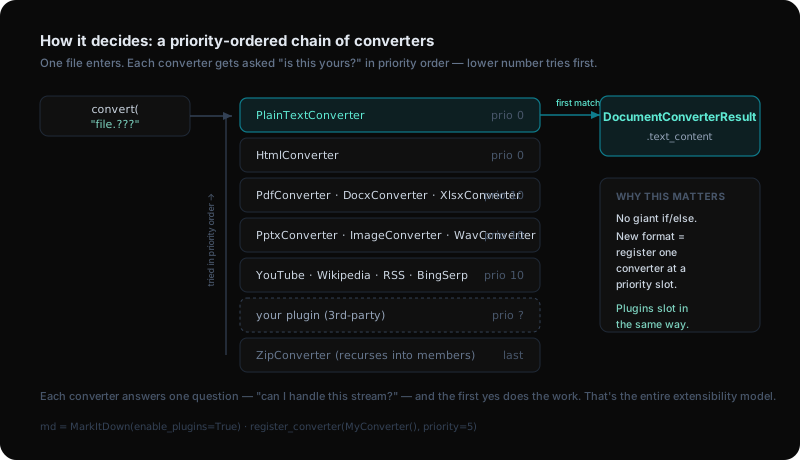
Pop the hood and the architecture is the genuinely instructive part — the kind of design worth stealing even if you never use the tool. MarkItDown is a priority-ordered chain of converters. When you call convert(), the file gets offered to each registered converter in order, and the first one that says "yes, that's mine" does the work. Lower priority number means it gets asked first.
That ordering isn't an accident. The cheap, unambiguous converters sit at the front — plain text and HTML at priority 0 — so common cases resolve instantly. The format-specific heavyweights (PDF, Office, images, audio) sit at priority 10. And the ZIP converter sits dead last on purpose, because it recurses: it unpacks the archive and re-runs the whole chain on each member, so it must only fire once everything else has declined.
Why this matters beyond trivia: adding a new format is registering one converter at a priority slot — not editing a 500-line switch statement. That's the same mechanism third-party plugins use. Your custom converter slots into the exact same chain at whatever priority you choose. The extensibility model and the internal architecture are the same thing, which is the mark of a design that'll age well.
Here's the loop that closes nicely: MarkItDown prepares files for LLMs, and it can also use an LLM as part of the conversion. Pass it an OpenAI-style client and a model name, and the image converter will write actual descriptions of pictures instead of just scraping whatever OCR text it finds. A chart with no caption becomes a sentence describing the chart. That's the difference between "image: 4 unreadable axis labels" and a usable paragraph your retrieval system can match against.
For the heavier enterprise lifting, MarkItDown plugs into Azure Document Intelligence for high-quality PDF and document extraction, and Azure Content Understanding for audio and video — the latter can even pull structured fields out into YAML front-matter. Those paths are billable and optional; the local converters cost nothing and need no cloud.
The shape of the whole product is now visible: a free, fast, local core for the common cases, with opt-in escape hatches to a bigger model or a paid cloud service for the documents that genuinely need them. You start cheap and only pay where the quality actually requires it.
Now the part I refuse to bury, because it's the part that bites teams who treat a convenience tool as a safe one. MarkItDown performs I/O with the privileges of the current process. It opens files, follows references, reaches out to URLs — all as you, with your permissions. Hand it a malicious or booby-trapped document and it'll do exactly what that document's structure tells it to, with your access.
The project's own guidance is the right guidance: *sanitize inputs in untrusted environments, and call the narrowest `convert_ function you can** rather than the catch-all convert()`. If you know it's a PDF, use the PDF path — don't hand an unknown file to a dispatcher that's willing to try a dozen converters, one of which might fetch a remote resource you didn't intend. And plugins are off by default for the same reason: third-party code in your conversion path is a supply-chain decision, not a feature toggle, so MarkItDown makes you opt in deliberately.
None of this makes the tool dangerous. It makes it honest. A library that quietly did network I/O on your behalf without telling you would be far worse than one that documents it in a security note. I'd rather a tool name its sharp edges than hide them.
It does I/O as you, with your permissions. That's not a flaw to hide — it's a footnote to respect.
The reason MarkItDown is on this list of tools I actually used: it's the unglamorous front door to anything that feeds documents to a model. The chatbot on this site answers questions about my work, and the knowledge behind it doesn't start life as tidy Markdown — it starts as the same pile of formats everyone has. A tool that flattens report.pdf, deck.pptx, and a half-dozen other shapes into one clean stream is exactly the boring infrastructure that makes the interesting parts possible.
It also ships with `markitdown-mcp`, a server that exposes conversion over the Model Context Protocol — which means an agent can call "turn this file into Markdown" as a tool, mid-conversation, without you writing glue code. That's the direction this whole space is going: the file-prep step stops being a script you run and becomes a capability your agent reaches for on its own.
Install is one line — pip install 'markitdown[all]' for every converter, or pick the extras you need. If you're building anything that puts your own documents in front of an LLM, this is the kind of dependency you add once, stop thinking about, and quietly rely on every day after. The best tools are the ones that disappear, and a converter that just turns your mess into Markdown and gets out of the way is about as disappear-able as it gets.
Building AI products in public.
Occasional notes on what I'm shipping, what's working, and what broke — straight to your inbox. No spam, unsubscribe anytime.
Product leader shipping across enterprise SaaS, AI in production, and 0→1. Writing about what actually ships — not what sounds good in a deck.