shadcn/ui: components you actually own
Pre-built building blocks that live inside your project instead of in someone else's package. Customize freely, no waiting on someone else to fix things.
Most UI building blocks work like renting furniture — you pick from someone else's catalog, and if the couch does not quite fit your room, tough luck. shadcn/ui works differently. Instead of renting, you get the blueprints copied directly into your project. The button, the card, the dialog box — they are all yours to modify however you want. No waiting for the furniture company to release a new color.
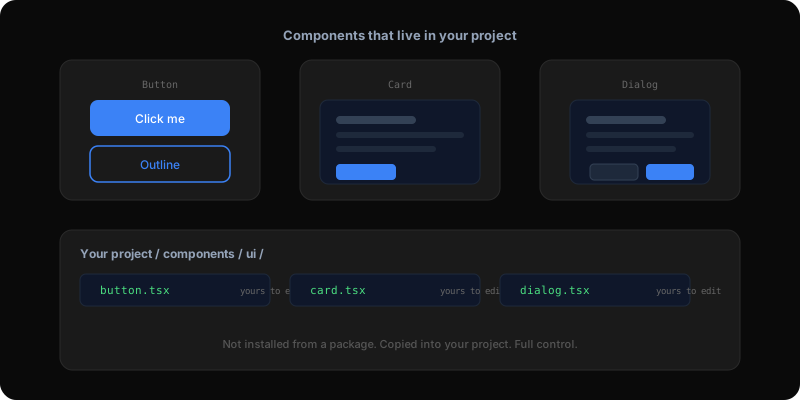
This site uses shadcn/ui for the standard patterns: the button styles, the card layouts for case studies, the dialog for the chatbot, the dropdown menus. Each one was customized after installation. The buttons use my exact accent color. The cards have sharper corners and thinner borders than the default. The chatbot dialog has a custom width and animation.
Because the components live in my project as regular files, customizing them is just editing code. No override hacks, no specificity battles, no praying the next update does not break my customizations. When I wanted the case study cards to have a subtle hover effect that changes the border color, I opened the card file and added it. Done.
A specific example: the post reader component that renders every blog post on this site. It uses shadcn-style patterns for the metadata row, the pull quote block, and the author card. But every one of those has been customized — the pull quote uses a serif font with an accent-colored left border, the metadata uses ultra-small uppercase monospaced text. These customizations would be painful with a traditional component library. With shadcn, they are trivial.
One of the most underrated features: shadcn components come pre-built with accessibility features. Keyboard navigation, screen reader labels, focus management, proper ARIA attributes. These are the things most people skip when building from scratch because they are invisible to sighted users. But they matter enormously for anyone using assistive technology.
By starting with shadcn, you get accessibility for free. Then you customize the visual layer on top without losing the underlying accessibility work. It is like inheriting a house with good plumbing — you can repaint every wall without touching the pipes.
Run a quick setup command that creates a folder in your project for UI components. Then add individual components as you need them — a button here, a dropdown there. Each one arrives as a fully readable, editable file.
Use shadcn for the standard patterns every app needs: buttons, cards, dialog boxes, dropdowns, navigation menus. Build custom for things unique to your product — a specialized data display, a custom onboarding flow, a unique interactive feature. The sweet spot is letting shadcn handle the common stuff so you can spend your creative energy on the things that make your product different.
Building AI products in public.
Occasional notes on what I'm shipping, what's working, and what broke — straight to your inbox. No spam, unsubscribe anytime.
Product leader shipping across enterprise SaaS, AI in production, and 0→1. Writing about what actually ships — not what sounds good in a deck.