I built and deployed a product in two months without writing code the traditional way
105 commits across April and May. Every file written through conversation with an AI. Here is what two months of building with Claude Code actually looked like.
Two months ago I had an idea and no product. Today I have a live portfolio at nirmitmeher.com with a working AI chatbot, ten detailed blog posts, a deploy system with safety guardrails, and a site that ranks in search results. The entire thing was built through conversation. Not 'with AI assistance.' Through conversation. I described what I wanted, an AI proposed how to build it, I approved or pushed back, and the code appeared as a side effect of my decisions.
105 commits on GitHub tell the story from the outside. But the commit graph only shows when code was saved. It does not show the hours of conversation that shaped each change — the moments where I said 'no, make the corners sharper' or 'that animation is too aggressive, tone it down' or 'the blog page is blank on first load, fix it.'
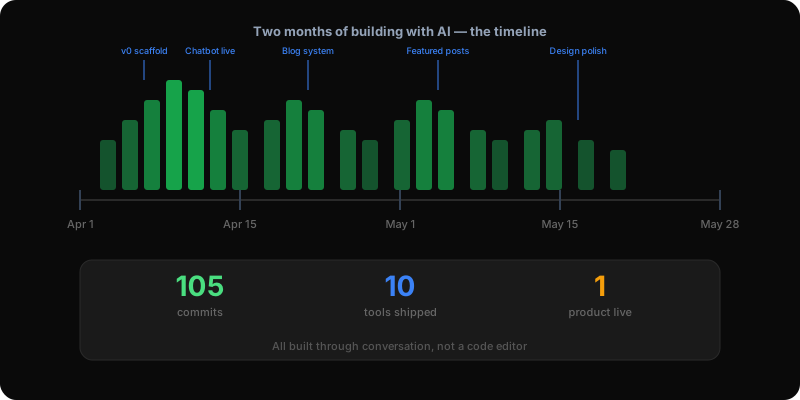
The project started with v0 generating the initial pages. A hero section, an about page, a blog layout, a work portfolio. The output looked like every other AI-generated site — generic, safe, forgettable. But the structure was sound. The routing worked. The responsive layout handled phones and desktops. Getting that skeleton for free in an afternoon was genuinely valuable.
I chose Next.js as the framework because I knew the site would eventually need a chatbot, and a chatbot needs server-side code running alongside the static pages. That decision — made in week one — saved me from a painful migration later. The same project that serves pre-built blog pages also handles live AI conversations.
TypeScript was there from day one. Every blog post, every component, every API response has a defined shape. When I later added new fields to the blog post format (like linking related posts together), TypeScript showed me every file that needed updating. Without it, those would have been bugs discovered by visitors.
This was the phase where the site stopped looking like a template and started looking like something I built. Tailwind CSS let me adjust every visual detail without leaving the component I was working on. Custom color variables meant I could shift the entire palette from one file. shadcn/ui gave me pre-built buttons, cards, and dialogs that I could customize freely because they lived in my project, not in someone else's package.
The 3D hero section came from Spline — a visual editor where you drag shapes, adjust lighting, and add mouse-follow interactions without knowing 3D modeling. It loads lazily so visitors never stare at a blank screen. On slow phones, it falls back gracefully.
Framer Motion handled the scroll animations. Sections fade in as you scroll down. Lists reveal items one at a time. It makes the site feel crafted instead of flat. But I learned the hard way that above-the-fold content cannot wait for a scroll trigger. I shipped a blank-looking blog page because the featured section was invisible until you scrolled — a trigger that never fires when you first open a page. That bug taught me the most important rule of scroll animation: if it is the first thing someone sees, show it immediately.
The chatbot uses two different AIs. A fast one (Llama 3.1, served by Groq) answers visitors in about 200 milliseconds. A separate one from a different family (gpt-oss-120b) scores every answer afterward on accuracy, voice, privacy, and helpfulness. If any score drops below three out of five, the conversation gets flagged for my review.
This dual-AI setup exists because the same AI that generates fast answers is not the best judge of their quality. Cross-family evaluation — using one model family (Meta's Llama) to write and a different one (OpenAI's open gpt-oss) to judge — is harder to game. Over time, the flagged conversations became test cases. Before deploying any chatbot change, I run previous low-scoring conversations through the new version to make sure the fixes work.
The system prompt is where the real work lives. It tells the chatbot exactly what it knows, how it should talk, and what it should refuse to answer. A well-written system prompt outperforms a more expensive AI model with a vague prompt. Being specific about rules matters more than raw intelligence.
The biggest shift is not about speed, although it is faster. The shift is about what your job becomes. I stopped thinking about syntax, file organization, and implementation details. I started thinking about what to build, why it matters, and whether the result is actually good. The AI handles the translation from decision to code. My job is to make the right decisions and catch the wrong ones.
The AI will happily ship something subtly broken if you let it. It does not have taste. It does not know what your site should feel like. It does not understand that a blank blog page is unacceptable even if the server returns a successful status code. You need to look at every change with the same skepticism you would give a junior team member — competent, fast, but needing supervision.
The rules file (CLAUDE.md) is the most underrated part of the workflow. It tells the AI your preferences before every session: what tools to use, what files not to touch, how to deploy, what conventions to follow. Without it, every session starts from scratch. With it, the AI already knows how your project works before you say a word.
The AI does not have taste. Your job is to be the taste.
105 commits over two months. Ten tools in the stack, each earning its place. One live product at a custom domain with SSL, analytics, speed monitoring, and a working AI chatbot. Every line of code written through conversation.
The GitHub contribution graph shows bursts of activity — heavy days with ten or more commits, then quiet days with none. That is what building with AI looks like. You have high-intensity sessions where ideas become working features in hours, followed by breaks where you think about what to build next. The rhythm is different from traditional development, where you write a little code every day. Here, you think for a while, then build in a burst, then think again.
Was every day productive? No. Were there frustrating moments where the AI confidently did the wrong thing? Yes. Did I ship bugs that I only caught because my deploy script refused to accept them? Absolutely. But the end result is a product that exists in the world, built in a fraction of the time it would have taken the traditional way. And every week, I get a little better at making decisions and a little faster at catching mistakes.
That is the real skill now. Not writing code. Making decisions. And then verifying that the code the AI wrote actually matches those decisions.
Building AI products in public.
Occasional notes on what I'm shipping, what's working, and what broke — straight to your inbox. No spam, unsubscribe anytime.
Product leader shipping across enterprise SaaS, AI in production, and 0→1. Writing about what actually ships — not what sounds good in a deck.